skyBlip Go

Every screen, as the firmware draws it.

Each picture is the 200×200 framebuffer of the simulator, driven into that state and read out pixel for pixel. A screen that changes on the device is a capture taken again.

The radar, both ways

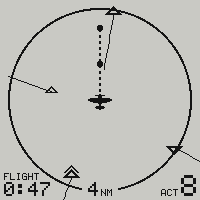
PLOT on the settings menu draws the radar one of two ways. ALL, the first choice and the one a device ships on, shrinks the ring and stands every aircraft past it on the band around it, on its bearing. TO SCALE puts every mark where the ring’s scale puts it, and leaves off what does not fit. Three skies, each captured both ways off the same firmware.

A sky that fits the ring.

Three aircraft inside four miles. With ALL they sit in the smaller ring, and nothing else changes. To scale, the ring is the large one.
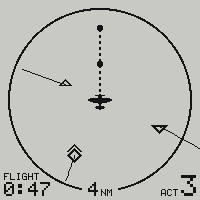
The radar page with PLOT ALL: the same three aircraft inside a smaller ring, and nothing on the band around it
PLOT ALL
The radar page to scale: three aircraft inside the four-mile ring, each with its one-minute leader line
PLOT TO SCALE

Traffic past the ring.

One aircraft closing from five miles ahead, a gaggle of three eight miles off the right of the nose, one eleven miles to the left. With ALL, each stands on the band, the gaggle is one mark counted 3, and the closing one’s minute is already inside the ring. To scale, only the one ahead reaches the glass.
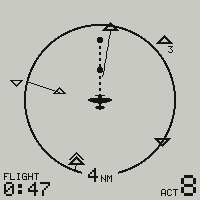
The radar page with PLOT ALL: on the band, an aircraft ahead with its leader entering the ring, one mark counted 3 to the upper right, and one aircraft to the left
PLOT ALL
The radar page to scale: the aircraft in the ring, and one more at the very top of the glass; the gaggle and the aircraft to the left are not drawn
PLOT TO SCALE

Traffic astern.

Three aircraft six to eight miles behind, and one inside the ring. With ALL they are one mark counted 3, stepped aside from the range label rather than under it. To scale, the three are off the glass.
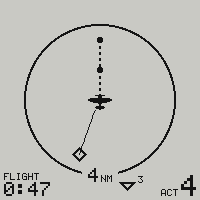
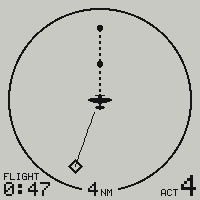
The radar page with PLOT ALL: the same aircraft in the ring, and beside the range label at the bottom one mark counted 3 for the aircraft astern
PLOT ALL
The radar page to scale: one aircraft in the ring behind and to the left, nothing else
PLOT TO SCALE

How the band reads

In flight

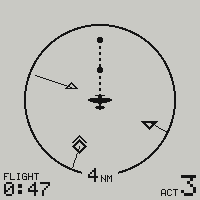
The radar page: three aircraft drawn as diamonds, one above, one below and one level and climbing, each with its one-minute leader line, own ship's dashed run with a ball at each of the next two minutes, the four-mile ring, the flight time and the count of aircraft heard
Radar
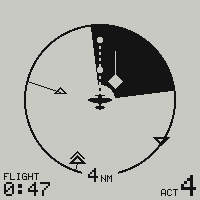
The radar page during a traffic advisory: a 90-degree sector leaning on the bearing of the traffic, turned black, with the filled diamond of the converging aircraft and its leader line reversed out of it
Traffic advisory
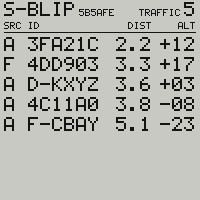
The nearby page: own callsign S-BLIP with its address beside it and the count of everything heard on the top line, then five aircraft listed nearest first, each with its source letter, its callsign or address, its ground distance and its relative altitude
Nearby
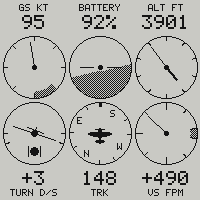
The six-pack page: ground speed, artificial horizon with the state of charge above it, altimeter, turn coordinator with its ball, track card and vertical speed
Six-pack
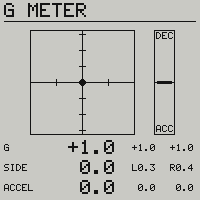
The g-meter page: the normal and lateral load as a marker in a field with the box of this flight's peaks around it, a fore-and-aft strip beside it, and three rows of figures in tenths of a g
G-meter

Radar and traffic  ·  Instruments

Settings

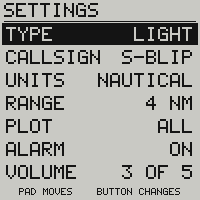
The radar menu: aircraft type, callsign, units, range, plot, alarm and volume, with the hint PAD MOVES - BUTTON CHANGES at the foot
The radar menu
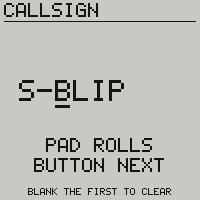
The callsign field: S-BLIP at triple height, a bar under the third character, PAD ROLLS over BUTTON NEXT, and BLANK THE FIRST TO CLEAR along the foot
The callsign field
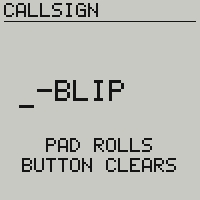
The callsign field with the first character rolled to a blank, the bar under it, and the hint now reading PAD ROLLS over BUTTON CLEARS
The first character blanked
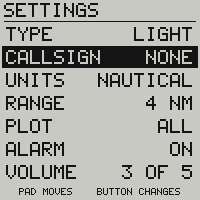
The radar menu after the press, the CALLSIGN row focused and reading NONE
One press later

Controls and menus

Diagnostics

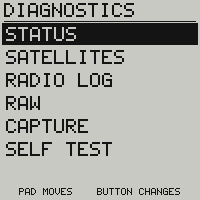
The nearby menu: status, satellites, radio log, raw, capture and self test, the six pages opened by name
The list’s menu
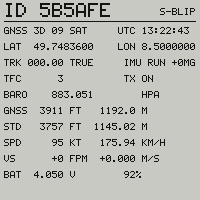
The status page: fix and satellites, position, track, traffic count, transmit state, the sensor hub, pressure, the two altitudes, speed, vertical speed, and the cell in volts and percent
Status
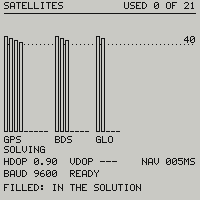
The satellites page: one bar per satellite grouped by constellation, against a dotted line at 40 dB-Hz
Satellites
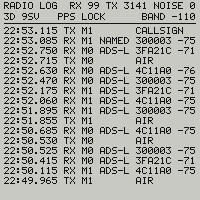
The radio log: under the fix, the PPS state and the noise floor, one row per burst heard or sent, newest first, with its time, direction, channel, what it carried, address and level
Radio log
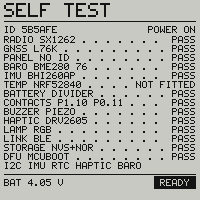
The self test page: one row per part of the board, each with the part that answered and its verdict
Self test
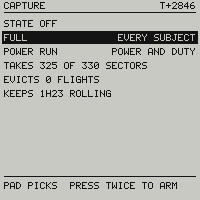
The capture page with nothing recording: the state off, the two captures to pick from, FULL for every subject and POWER RUN for power and duty, then the price of the one picked, the sectors of flash it would take, the stored flights it would evict and the hours of recording it would keep, and PAD PICKS, PRESS TWICE TO ARM along the foot
Capture

The pages opened by name

On the ground, and off

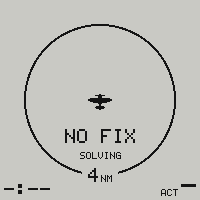
The radar page with no position: the empty ring carries the words NO FIX and, under them, how far the receiver has got
Waiting for the sky
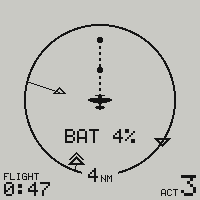
The radar page in flight on a low cell: BAT and the percentage in the ring, where the state word would stand
Low battery
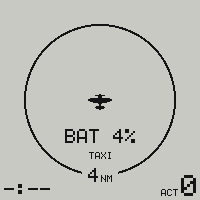
The radar page while taxiing on a low cell: BAT and the percentage in the ring, and TAXI under it
Low battery, taxiing
The parked screen of a device that has been switched off: the skyBlip wordmark, held by the e-paper with no power
Off
The screen of a device that switched itself off on an empty cell: the skyBlip wordmark with the words FLAT BATTERY under it
Out of battery

Power and battery

Asked on the glass

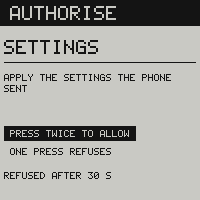
The authorisation prompt: AUTHORISE, SETTINGS, apply the settings the phone sent, PRESS TWICE TO ALLOW over ONE PRESS REFUSES, refused after 30 s
A settings write, asked on the glass
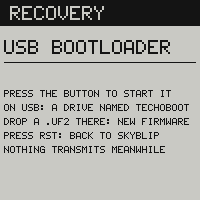
The recovery page: RECOVERY, USB BOOTLOADER, PRESS THE BUTTON TO START IT, then a drive named TECHOBOOT on USB, a .uf2 dropped there is new firmware, RST goes back to skyBlip, and nothing transmits meanwhile
Handed to the USB bootloader

Phone and firmware

Technical notes

Why the screen behaves the way it does.

The panel is a 1.54″ e-paper, 200×200 pixels. It keeps its last image with the rails down and draws nothing to keep it there, which is what makes the parked wordmark an indicator and a blank screen the right thing to store.

In flight, every frame is a partial refresh. The full waveform, the one that flashes the panel black and white for a second and a half, is spent twice in a session: at power on, and at power off. A page change goes through a single black wipe instead, and the alarm’s one flash a second is the panel’s own floor rather than a rate we picked. Faster is possible, and a large black region toggled that hard marks the glass for good.

Every feature  ·  Radar and traffic