With your phone, and without trusting it.
What an app can see, what it can ask for, and the glass that has the last word.
It appears by name, and three screens read it at once.
skyBlip Go 5B5AFE: the product, then its own 24-bit address. Nothing to pair, no code to type. It carries the FLARM NMEA stream on both of the Bluetooth serial profiles navigation software looks for, so the app you already fly with finds it.
The tablet on the yoke, the phone in a pocket and the passenger’s iPad all see the same traffic. Configuration is the one thing that is not shared: the first app to write keeps that right until it disconnects, and the second is told who holds it.
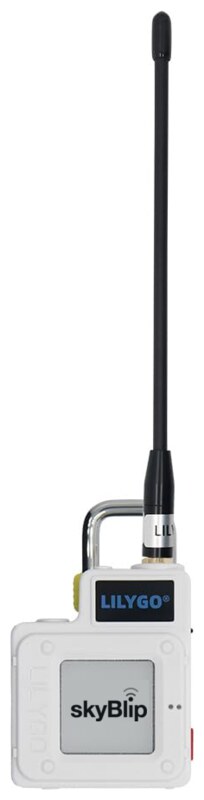
- No pairing, no code, no account
- Three connections at once
- Nordic UART and FLARM-style profiles
- SDVFR Next, SkyDemon, ForeFlight and the rest
- Up to sixteen flights kept on the device
- Collected over the same link on the ground
Two presses allow, one press refuses.
When an app asks for something that touches the device you have on board, new firmware, a restart into the USB bootloader, a settings write, erasing your flights, switching it off, the device does not take the phone at its word. It puts the question on its own glass, names it, and waits thirty seconds: PRESS TWICE TO ALLOW, ONE PRESS REFUSES. No answer inside the window counts as a refusal.
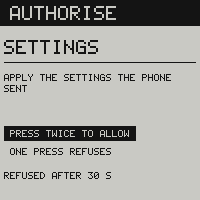
Your callsign is one of those writes. The app sends it, the glass asks, and from then on it is on the status screen, on the air once every ten seconds, and on the screens of the aircraft around you. You can also type it on the device itself, in the callsign field, or set it from a browser on the update page, beside the aircraft type, the units and the alarm.
Presses only count once the question has reached the glass and your thumb has stopped: a run of presses that was stepping a setting cannot be spent on an authorisation. The pad is inert while a question stands.
New firmware comes from a web page.
The update page sends a signed image over the same Bluetooth, from Chrome or Edge, and the glass asks once, naming the version, before it takes the image and installs it. The new firmware then has to bring its radio up, hear its receiver and draw its screen before it keeps itself. If it does not, the device goes back to the firmware it had, and to the settings you had when the update began.
Settings the device cannot read are never passed off as yours. It runs on its defaults, the self test’s STORAGE row reads NVS+NOR DEFAULTS, and the phone is told: check the callsign and the aircraft type before you fly.
When the firmware will not take at all, the same page hands the device to its USB bootloader, after the same two presses. The device switches itself off on the page below, and the next press starts the bootloader: on a USB cable the device is a drive named TECHOBOOT. A .uf2 dropped on it is new firmware, RST goes back to skyBlip, and nothing transmits meanwhile. Two presses of RST reach the same drive without a phone.
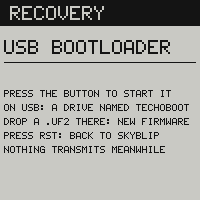
Technical notes
Why there is no pairing.
Turning Bluetooth pairing on encrypts the GATT characteristics, which is a known Web Bluetooth failure on Windows and would break the browser page that installs firmware. So the boundary is the image and not the link.
- The bootloader verifies a signature over our key
- An older version than the installed one is refused
- An open transport cannot install firmware
- Anything else it could ask for is ground-only
- Refused unless it is confirmed on the glass
- Physical presence, where a pairing code would be